Implementing MFA (TOTP) Authentication in a Full-Stack Web App
A step-by-step guide to adding Time-based One-Time Password (TOTP) multi-factor authentication to a full-stack web application.
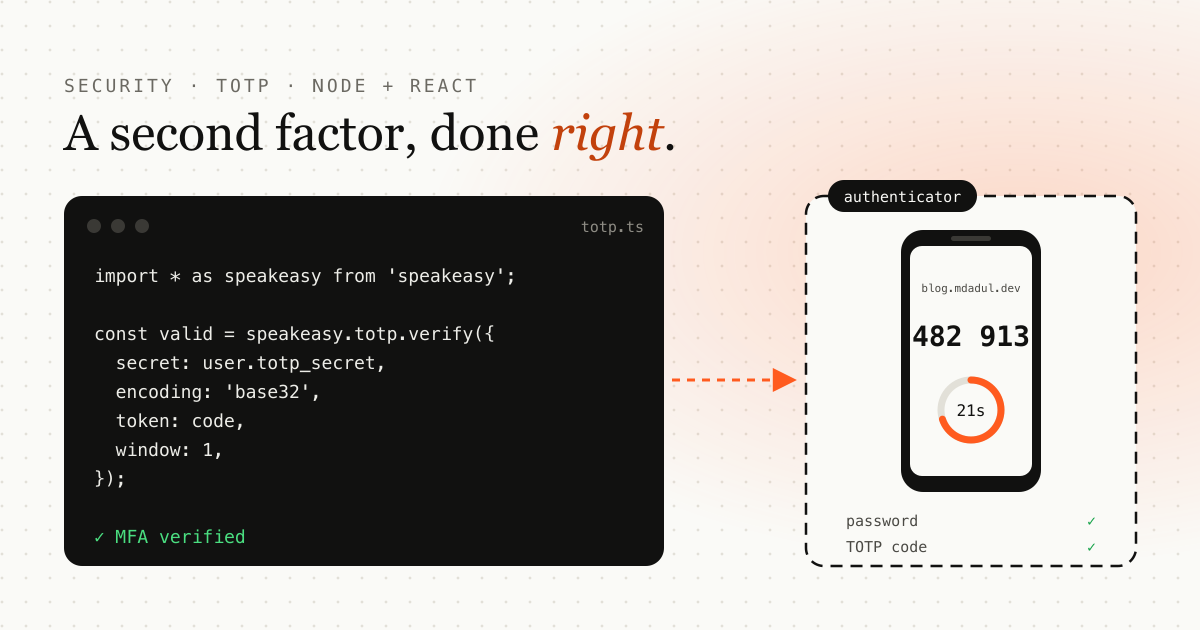
TL;DR: generate a TOTP secret with speakeasy, show it as a QR code, verify the first code to enable MFA, then require a 6-digit code at login. This guide builds the full flow with a Hono backend and a React frontend.
In today’s digital landscape, securing user accounts with just a password isn’t enough. Multi-Factor Authentication (MFA) adds an essential layer of security by requiring users to provide two or more verification factors. In this comprehensive guide, we’ll walk through implementing Time-based One-Time Password (TOTP) authentication in a full-stack web application.
Understanding MFA and TOTP
What is Multi-Factor Authentication?
Multi-Factor Authentication (MFA) is a security method that requires users to provide two or more verification factors to gain access to an account. These factors typically fall into three categories:
-
Something you know (password, PIN)
-
Something you have (smartphone, hardware token)
-
Something you are (fingerprint, facial recognition)
What is TOTP?
Time-based One-Time Password (TOTP) is a computer algorithm that generates a one-time password using the current time as a source of uniqueness. It’s standardized in RFC 6238 and is widely used by authenticator apps like Google Authenticator, Authy, and Microsoft Authenticator.
Key characteristics of TOTP:
-
Time-based: Codes expire every 30 seconds
-
Synchronized: Both server and client use the same time window
-
Secure: Based on HMAC-SHA1 cryptographic algorithm
-
Standardized: Works across different authenticator apps
Setting Up the Backend
Let’s start by setting up the necessary dependencies for our Node.js/Bun backend.
Dependencies
{
  "dependencies": {
    "speakeasy": "^2.0.0",
    "qrcode": "^1.5.4",
    "hono": "^4.6.3",
    "jsonwebtoken": "^9.0.2",
    "bcryptjs": "^2.4.3"
  },
  "devDependencies": {
    "@types/speakeasy": "^2.0.10",
    "@types/qrcode": "^1.5.5"
  }
}
Core Libraries Explained
-
speakeasy: The core library for TOTP generation and verification
-
qrcode: Generates QR codes that users can scan with their authenticator apps (if you’re a .NET developers, you can use IronQr)
-
hono: Fast web framework (you can substitute with Express.js)
-
jsonwebtoken: For JWT token management
-
bcryptjs: For password hashing
TOTP Utility Setup
First, let’s create a utility file to export our TOTP dependencies:
// src/utils/totp.ts
import * as speakeasy from 'speakeasy';
import QRCode from 'qrcode';
export { speakeasy, QRCode };
Database Schema
The database schema needs to support MFA by storing the TOTP secret and status for each user:
CREATE TABLE IF NOT EXISTS users (
  id INTEGER PRIMARY KEY AUTOINCREMENT,
  email TEXT UNIQUE NOT NULL,
  password_hash TEXT NOT NULL,
  totp_secret TEXT,              -- Base32 encoded secret for TOTP
  totp_enabled INTEGER DEFAULT 0, -- Boolean flag for MFA status
  last_login TEXT
);
Key Fields for MFA
-
totp_secret: Stores the Base32 encoded secret used for TOTP generation
-
totp_enabled: Boolean flag indicating whether MFA is enabled for the user
Backend API Implementation
Now let’s implement the complete MFA flow with five key endpoints:
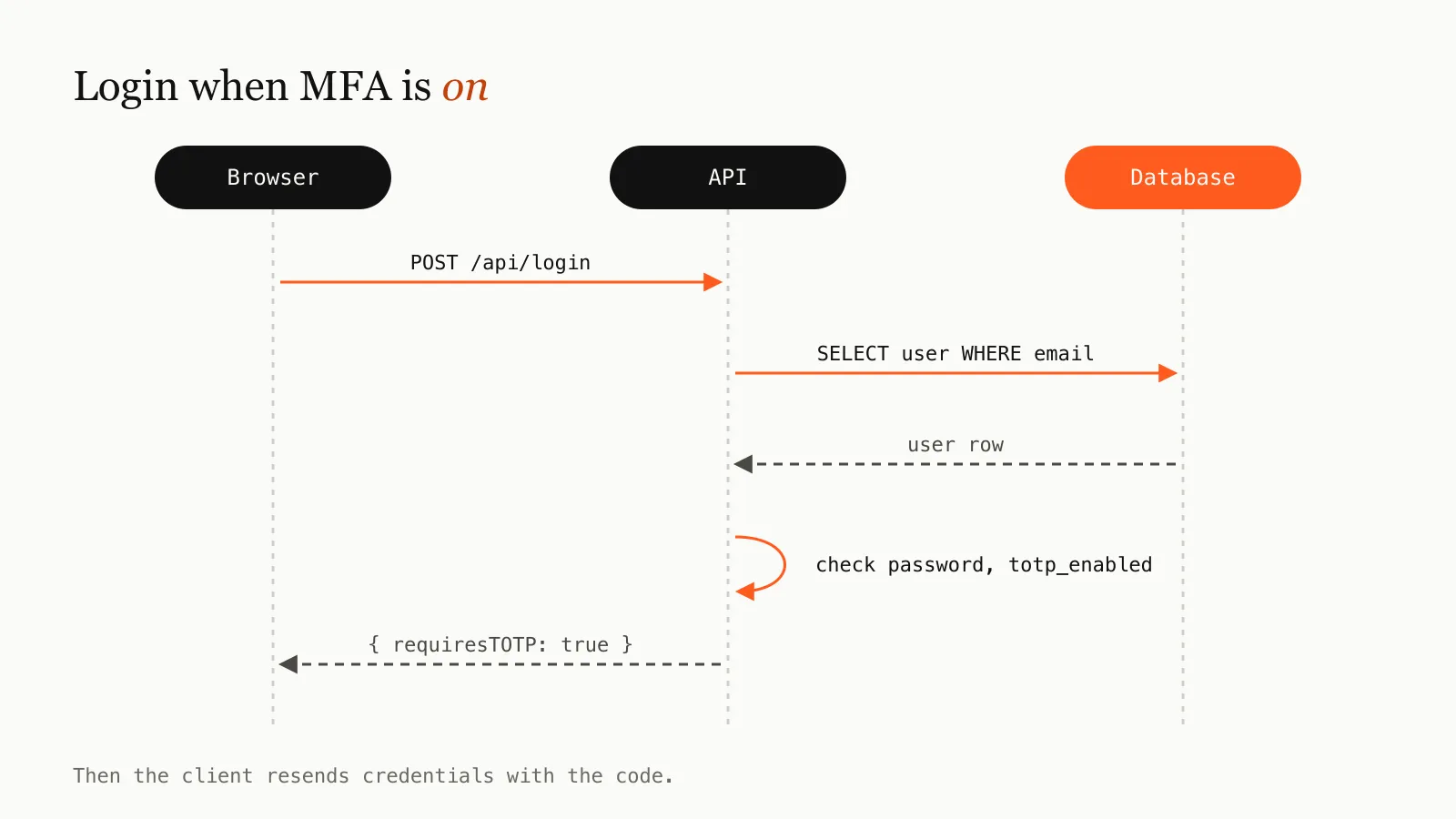
1. Enhanced Login Endpoint
// Enhanced login to check for MFA requirement
app.post('/api/login', async (c: any) => {
  const ip = c.req.header('x-forwarded-for') || c.req.header('x-real-ip') || 'unknown';

  // Rate limiting
  if (rateLimit(ip, 'login', 10, 60_000)) {
    return c.json({ error: 'Too many requests' }, 429);
  }
  const { email, password } = await c.req.json();

  // Validate input
  if (!isValidEmail(email) || !isValidPassword(password)) {
    return c.json({ error: 'Invalid credentials' }, 401);
  }

  const user: any = db.query('SELECT * FROM users WHERE email = ?').get(email);
  if (!user) return c.json({ error: 'Invalid credentials' }, 401);

  const valid = await verifyPassword(password, user.password_hash);
  if (!valid) return c.json({ error: 'Invalid credentials' }, 401);
  // Check if MFA is enabled
  if (user.totp_enabled) {
    return c.json({ requiresTOTP: true });
  }
  // Standard login flow for users without MFA
  db.run('UPDATE users SET last_login = ? WHERE id = ?', [new Date().toISOString(), user.id]);
  const token = generateJWT(user);

  return c.json({
    token,
    user: { email: user.email, totpEnabled: !!user.totp_enabled }
  });
});
2. MFA Login Verification
When the first login returns requiresTOTP, the client sends the credentials again together with the 6-digit code:
// Login with 2FA
app.post('/api/login-2fa', async (c: any) => {
  const { email, password, totpCode } = await c.req.json();

  // Validate credentials first
  const user: any = db.query('SELECT * FROM users WHERE email = ?').get(email);
  if (!user) return c.json({ error: 'Invalid credentials' }, 401);
  const valid = await verifyPassword(password, user.password_hash);
  if (!valid) return c.json({ error: 'Invalid credentials' }, 401);
  // Ensure MFA is enabled
  if (!user.totp_enabled || !user.totp_secret) {
    return c.json({ error: '2FA not enabled' }, 400);
  }
  // Verify TOTP code
  const verified = speakeasy.totp.verify({
    secret: user.totp_secret,
    encoding: 'base32',
    token: totpCode,
    window: 1  // Allow one 30-second step of clock drift either way
  });
  if (!verified) {
    return c.json({ error: 'Invalid 2FA code' }, 401);
  }
  // Successful login
  db.run('UPDATE users SET last_login = ? WHERE id = ?', [new Date().toISOString(), user.id]);
  const token = generateJWT(user);

  return c.json({
    token,
    user: { email: user.email, totpEnabled: !!user.totp_enabled }
  });
});
.NET (C#) — TOTP Verification:
using OtpNet;

public bool VerifyTotp(string base32Secret, string totpCode)
{
    // Decode Base32 secret (same as encoding: 'base32' in speakeasy)
    var secretBytes = Base32Encoding.ToBytes(base32Secret);

    // Create TOTP instance (30s step, 6 digits, SHA1)
    var totp = new Totp(secretBytes);

    // Verify with ±30s window (same as window: 1)
    bool verified = totp.VerifyTotp(
        totpCode,
        out long timeStepMatched,
        new VerificationWindow(previous: 1, future: 1)
    );

    return verified;
}
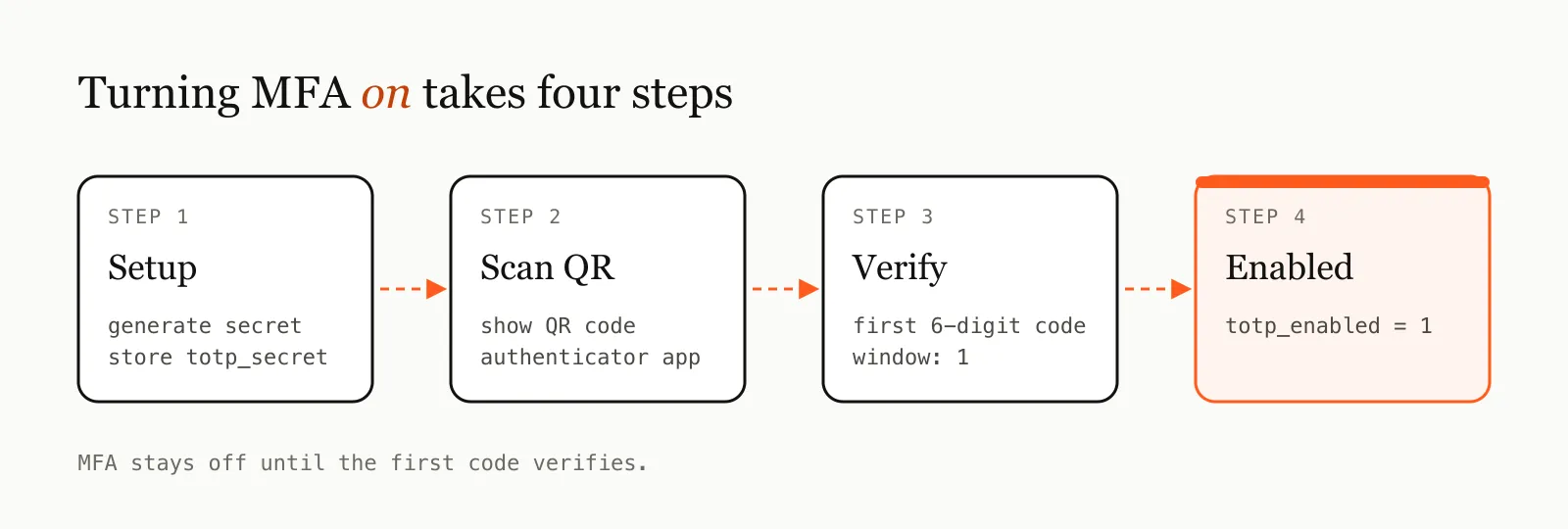
3. MFA Setup Endpoint
// Generate MFA secret and QR code
app.post('/api/2fa/setup', authMiddleware, async (c: any) => {
  const user = c.get('user');

  // Generate a new secret
  const secret = speakeasy.generateSecret({
    name: `AuthApp:${user.email}`,
    issuer: 'AuthApp'
  });

  // Store the secret (temporarily until verified)
  db.run('UPDATE users SET totp_secret = ? WHERE id = ?', [secret.base32, user.id]);

  // Generate QR code data URL
  const otpauthUrl = secret.otpauth_url;
  const qrCodeDataUrl = await QRCode.toDataURL(otpauthUrl);

  return c.json({
    secret: secret.base32,
    qrCode: qrCodeDataUrl
  });
});
For .NET developers implementing the same TOTP flow, the Iron Suite includes IronQR for generating the authenticator QR codes. The setup works similarly to the Node.js approach but integrates natively with ASP.NET Core or any C# backend.
using IronQr;
using OtpNet;

// Generate TOTP secret
var secret = Base32Encoding.ToString(KeyGeneration.GenerateRandomKey(20));
var otpauthUrl = $"otpauth://totp/YourApp:{userEmail}?secret={secret}&issuer=YourApp";

// Generate QR code
var qrCode = QrWriter.Write(otpauthUrl);
var qrDataUrl = $"data:image/png;base64,{Convert.ToBase64String(qrCode.SaveAsPng())}";

return new { secret, qrCode = qrDataUrl };
4. MFA Verification and Activation
// Verify TOTP code and enable MFA
app.post('/api/2fa/verify', authMiddleware, async (c: any) => {
  const user = c.get('user');
  const { token } = await c.req.json();

  const dbUser: any = db.query('SELECT * FROM users WHERE id = ?').get(user.id);
  if (!dbUser || !dbUser.totp_secret) {
    return c.json({ error: 'No 2FA setup in progress' }, 400);
  }

  // Verify the provided TOTP code
  const verified = speakeasy.totp.verify({
    secret: dbUser.totp_secret,
    encoding: 'base32',
    token,
    window: 1
  });
  if (!verified) {
    return c.json({ error: 'Invalid code' }, 400);
  }
  // Enable MFA for the user
  db.run('UPDATE users SET totp_enabled = 1 WHERE id = ?', [user.id]);

  return c.json({ success: true });
});
5. MFA Disable Endpoint
// Disable MFA for user
app.post('/api/2fa/disable', authMiddleware, async (c: any) => {
  const user = c.get('user');

  // Clear MFA settings
  db.run('UPDATE users SET totp_enabled = 0, totp_secret = NULL WHERE id = ?', [user.id]);

  return c.json({ success: true });
});
Frontend Implementation
Now let’s implement the frontend components to handle the MFA flow. The examples use TanStack Query mutations for the API calls.
1. Authentication API Client
// src/api/auth.ts
export interface LoginResponse {
  token?: string;
  requiresTOTP?: boolean;
  totpEnabled?: boolean;
  error?: string;
}
export interface MFASetupResponse {
  secret: string;
  qrCode: string;
}
const getBaseUrl = () => {
  return import.meta.env.VITE_API_BASE_URL || 'http://localhost:3001/api';
};
export async function login(email: string, password: string): Promise<LoginResponse> {
  const res = await fetch(`${getBaseUrl()}/login`, {
    method: 'POST',
    headers: { 'Content-Type': 'application/json' },
    body: JSON.stringify({ email, password })
  });
  return res.json();
}
export async function verifyTOTP(email: string, password: string, totpCode: string): Promise<LoginResponse> {
  const res = await fetch(`${getBaseUrl()}/login-2fa`, {
    method: 'POST',
    headers: { 'Content-Type': 'application/json' },
    body: JSON.stringify({ email, password, totpCode })
  });
  return res.json();
}
export async function setupMFA(token: string): Promise<MFASetupResponse> {
  const res = await fetch(`${getBaseUrl()}/2fa/setup`, {
    method: 'POST',
    headers: { 'Authorization': `Bearer ${token}` }
  });
  return res.json();
}
export async function verifyMFA(token: string, totpCode: string): Promise<{ success: boolean }> {
  const res = await fetch(`${getBaseUrl()}/2fa/verify`, {
    method: 'POST',
    headers: {
      'Authorization': `Bearer ${token}`,
      'Content-Type': 'application/json'
    },
    body: JSON.stringify({ token: totpCode })
  });
  return res.json();
}
2. Enhanced Login Component
// Enhanced login flow with MFA detection
const handleLogin = async (e: React.FormEvent) => {
  e.preventDefault();
  setError('');
  setLoading(true);
  try {
    const response = await login(email, password);

    if (response.requiresTOTP) {
      // Store credentials temporarily for 2FA verification
      sessionStorage.setItem('loginEmail', email);
      sessionStorage.setItem('loginPassword', password);
      navigate('/verify'); // Redirect to 2FA verification page
    } else if (response.token) {
      setToken(response.token);
      navigate('/dashboard');
    } else {
      setError(response.error || 'Login failed');
    }
  } catch (error) {
    setError('Network error');
  } finally {
    setLoading(false);
  }
};
3. TOTP Verification Component
// src/pages/Verify.tsx
const Verify = () => {
  const [totpCode, setTotpCode] = useState('');
  const [error, setError] = useState('');
  const navigate = useNavigate();
  const { setToken } = useAuth();

  const email = sessionStorage.getItem('loginEmail') || '';
  const password = sessionStorage.getItem('loginPassword') || '';
  const mutation = useMutation({
    mutationFn: () => verifyTOTP(email, password, totpCode),
    onSuccess: (data) => {
      if (data.token) {
        setToken(data.token);
        // Clean up stored credentials
        sessionStorage.removeItem('loginEmail');
        sessionStorage.removeItem('loginPassword');
        navigate('/dashboard');
      } else {
        setError(data.error || '2FA failed');
      }
    },
    onError: () => setError('Network error')
  });
  return (
    <div className="verification-container">
      <h2>Two-Factor Verification</h2>
      <p>Enter the 6-digit code from your authenticator app</p>

      <form onSubmit={handleVerify}>
        <input
          type="text"
          value={totpCode}
          onChange={e => setTotpCode(e.target.value)}
          required
          maxLength={6}
          pattern="[0-9]{6}"
          placeholder="123456"
          className="totp-input"
        />

        <button type="submit" disabled={mutation.isPending}>
          {mutation.isPending ? 'Verifying...' : 'Verify & Login'}
        </button>
      </form>

      {error && <div className="error">{error}</div>}
    </div>
  );
};
4. MFA Setup Modal Component
// MFA Setup component with QR code display
const MFASetupModal = ({ isOpen, onClose, token }) => {
  const [qrCode, setQrCode] = useState('');
  const [totpCode, setTotpCode] = useState('');
  const [error, setError] = useState('');

  const setupMutation = useMutation({
    mutationFn: () => setupMFA(token),
    onSuccess: (data) => {
      setQrCode(data.qrCode);
      setError('');
    },
    onError: () => setError('Failed to setup MFA')
  });
  const verifyMutation = useMutation({
    mutationFn: () => verifyMFA(token, totpCode),
    onSuccess: () => {
      onClose();
      // Refresh user data to show MFA as enabled
    },
    onError: () => setError('Invalid verification code')
  });
  return (
    <div className={`modal ${isOpen ? 'open' : ''}`}>
      <div className="modal-content">
        <h3>Setup Multi-Factor Authentication</h3>

        {!qrCode ? (
          <button onClick={() => setupMutation.mutate()}>
            {setupMutation.isPending ? 'Setting up...' : 'Start MFA Setup'}
          </button>
        ) : (
          <>
            <p>Scan this QR code with your authenticator app:</p>
            <img src={qrCode} alt="MFA QR Code" className="qr-code" />

            <form onSubmit={handleVerify}>
              <input
                type="text"
                value={totpCode}
                onChange={e => setTotpCode(e.target.value)}
                placeholder="Enter verification code"
                maxLength={6}
                pattern="[0-9]{6}"
                required
              />

              <button type="submit" disabled={verifyMutation.isPending}>
                {verifyMutation.isPending ? 'Verifying...' : 'Verify & Enable MFA'}
              </button>
            </form>
          </>
        )}

        {error && <div className="error">{error}</div>}
        <button onClick={onClose}>Close</button>
      </div>
    </div>
  );
};
Security Considerations
1. Secret Storage
-
Never expose secrets: TOTP secrets should never be sent to the frontend after initial setup
-
Secure storage: Use proper database encryption for storing TOTP secrets
-
Environment isolation: Keep secrets separate from other application data
2. Rate Limiting
Implement aggressive rate limiting on MFA endpoints. A six-digit code has only a million possibilities, so unlimited attempts make brute force practical:
// Example rate limiting configuration
const rateLimits = {
  login: { attempts: 10, window: 60000 },     // 10 attempts per minute
  login2fa: { attempts: 5, window: 60000 },   // 5 attempts per minute
  mfaSetup: { attempts: 3, window: 3600000 }  // 3 attempts per hour
};
3. Time Window Management
-
Clock skew tolerance: Use a window of ±1 period (30 seconds) to account for clock differences
-
Prevent replay attacks: Consider implementing used token tracking for high-security applications
4. Backup Codes
Consider implementing backup codes for account recovery:
// Generate backup codes during MFA setup
const generateBackupCodes = () => {
  const codes = [];
  for (let i = 0; i < 10; i++) {
    codes.push(crypto.randomBytes(4).toString('hex').toUpperCase());
  }
  return codes;
};
5. Session Management
-
Clear temporary data: Remove stored credentials after successful 2FA verification. The demo keeps the password in
sessionStoragebetween the two login steps to stay simple. In production, return a short-lived, single-use challenge token from the first step and send that, not the password, with the TOTP code -
Session timeout: Implement shorter session timeouts for MFA-enabled accounts
-
Device management: Consider implementing trusted device functionality
Testing Your Implementation
1. Unit Tests for TOTP Functions
// tests/unit/totp.test.ts
import { describe, it, expect } from 'bun:test';
import { speakeasy } from '../../src/utils/totp';
describe('TOTP Functions', () => {
  it('should generate and verify TOTP codes', () => {
    const secret = speakeasy.generateSecret();
    const token = speakeasy.totp({
      secret: secret.base32,
      encoding: 'base32'
    });

    const verified = speakeasy.totp.verify({
      secret: secret.base32,
      encoding: 'base32',
      token,
      window: 1
    });

    expect(verified).toBe(true);
  });
  it('should reject invalid TOTP codes', () => {
    const secret = speakeasy.generateSecret();

    const verified = speakeasy.totp.verify({
      secret: secret.base32,
      encoding: 'base32',
      token: '000000',
      window: 1
    });

    expect(verified).toBe(false);
  });
});
2. Integration Tests
// tests/integration/mfa.test.ts
import { describe, it, expect, beforeAll, afterAll } from 'bun:test';
import { app } from '../../src/app';

describe('MFA Integration Tests', () => {
  let userToken: string;

  beforeAll(async () => {
    // Setup test user and login
    const loginResponse = await app.request('/api/login', {
      method: 'POST',
      headers: { 'Content-Type': 'application/json' },
      body: JSON.stringify({ email: 'test@example.com', password: 'password123' })
    });

    const data = await loginResponse.json();
    userToken = data.token;
  });
  it('should setup MFA and return QR code', async () => {
    const response = await app.request('/api/2fa/setup', {
      method: 'POST',
      headers: { 'Authorization': `Bearer ${userToken}` }
    });

    expect(response.status).toBe(200);

    const data = await response.json();
    expect(data.secret).toBeDefined();
    expect(data.qrCode).toBeDefined();
    expect(data.qrCode).toMatch(/^data:image\/png;base64,/);
  });
});
3. Manual Testing Checklist
✅ Setup Flow
-
[ ] QR code generation works
-
[ ] QR code scans correctly in authenticator apps
-
[ ] TOTP verification during setup works
-
[ ] MFA status updates correctly
✅ Login Flow
-
[ ] Regular login works without MFA
-
[ ] Login with MFA enabled prompts for 2FA
-
[ ] Invalid TOTP codes are rejected
-
[ ] Valid TOTP codes allow login
-
[ ] Rate limiting prevents brute force
✅ Edge Cases
-
[ ] Clock skew tolerance works
-
[ ] Network interruptions are handled gracefully
-
[ ] Invalid QR codes don’t break the app
-
[ ] Disabling MFA works correctly
Source Code: https://github.com/emdadulislam1/auth-app
Conclusion
Implementing TOTP-based MFA significantly enhances your application’s security posture. The implementation we’ve covered includes:
Key Benefits Achieved
-
Enhanced Security: Users’ accounts are protected even if passwords are compromised
-
Industry Standard: Uses RFC 6238 TOTP standard, compatible with all major authenticator apps
-
User-Friendly: Simple setup process with QR code scanning
-
Scalable: Can handle multiple users and devices efficiently
Next Steps
Consider these enhancements for production applications:
-
Backup Codes: Implement recovery codes for when users lose their devices
-
SMS Fallback: Add SMS-based 2FA as a backup option
-
Device Management: Allow users to manage trusted devices
-
Admin Controls: Add administrative controls for MFA policies
-
Audit Logging: Log all MFA events for security monitoring
Security Reminders
-
Always use HTTPS in production
-
Implement proper rate limiting
-
Store secrets securely
-
Monitor for suspicious authentication patterns
-
Keep dependencies updated
By following this guide, you’ve implemented a robust, secure, and user-friendly MFA system that follows industry best practices. Your users can now enjoy enhanced account security while maintaining a smooth authentication experience.
Storing user uploads too? See how to self-host S3-compatible storage with MinIO and Caddy.
Remember: Security is an ongoing process. Regularly review and update your implementation to address new threats and vulnerabilities.
Frequently asked questions
What is TOTP authentication?
Time-based One-Time Password (TOTP, RFC 6238) generates a short code from a shared secret and the current time. Authenticator apps such as Google Authenticator, Authy and Microsoft Authenticator refresh it every 30 seconds.
Why allow a time window when verifying TOTP codes?
Phone and server clocks drift a little. A window of 1 accepts the codes from one 30-second step before and after the current one.
Is TOTP safer than SMS codes?
Generally yes. TOTP codes are generated on the device, so they can't be intercepted through SIM swapping or message interception the way SMS codes can.
What should I add after TOTP works?
Backup codes for account recovery, rate limiting on every MFA endpoint, encrypted secret storage, and audit logs for MFA events.
Emdadul Islam
I build web, mobile and backend products, and write up what I learn along the way: the bugs, the trade-offs and the fixes that held up in production. More about me →
Next article
Setting Up Husky, ESLint, and Prettier in a Node.js Application
Configure Husky, lint-staged, ESLint, and Prettier in a Node.js app to lint and format code automatically on every commit.